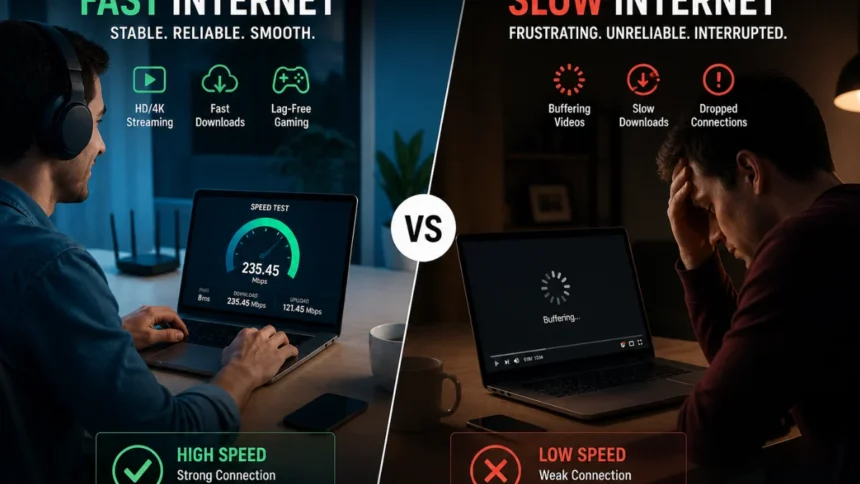
You know that exact moment? The one almost everyone knows all too well. It’s 7 p.m., and your video starts buffering right as things are getting interesting. Or your file just won’t upload with minutes left until the deadline. Or you’re in the middle of a call, and suddenly, silence—both you and the other person are just stuck there.
It’s usually not a huge disaster. Just a little pause. But it happens often enough to make you feel like something’s definitely not right.
What we often just call “slow internet” is rarely about one single thing. More often, it’s a whole chain reaction—your devices, the network, the infrastructure, and even how we use the internet all working together in ways we barely even think about. And that’s when tech problems and digital issues stop being vague ideas and start feeling like real, everyday annoyances.
The Real Meaning of “Slow Internet”
Many folks tend to think of internet speed solely in terms of how quickly files download, but that’s just one piece of the puzzle.

The actual performance of your connection relies on three key elements:
1. Speed (or Bandwidth):This refers to how much data can zip through your connection at any given moment.
2. Latency: This is about how snappy the response is—how fast data travels back and forth.
3. Stability: This means whether your connection holds steady without dropping or fluctuating.
You might have super-fast bandwidth, but still encounter lag if the latency is too high. Conversely, you could have a connection that stays connected reliably, but still slow to a crawl unpredictably if the available bandwidth gets crowded or shared heavily.
That’s precisely why two families using the exact same internet plan might end up having very different online experiences.

Where Things Usually Go Wrong
1. Network Congestion: Everyone Is Online at Once
Evenings are the worst. Streaming platforms, gaming, video calls—everything peaks at the same time.

Your connection isn’t just yours. It’s part of a shared network, especially in urban areas. When demand spikes, speeds drop.
This is one of the most common Technology & Digital Issues, particularly in densely populated regions.
2. Your Wi-Fi Setup Is Working Against You
Routers are often treated like invisible utilities—plug it in and forget it.

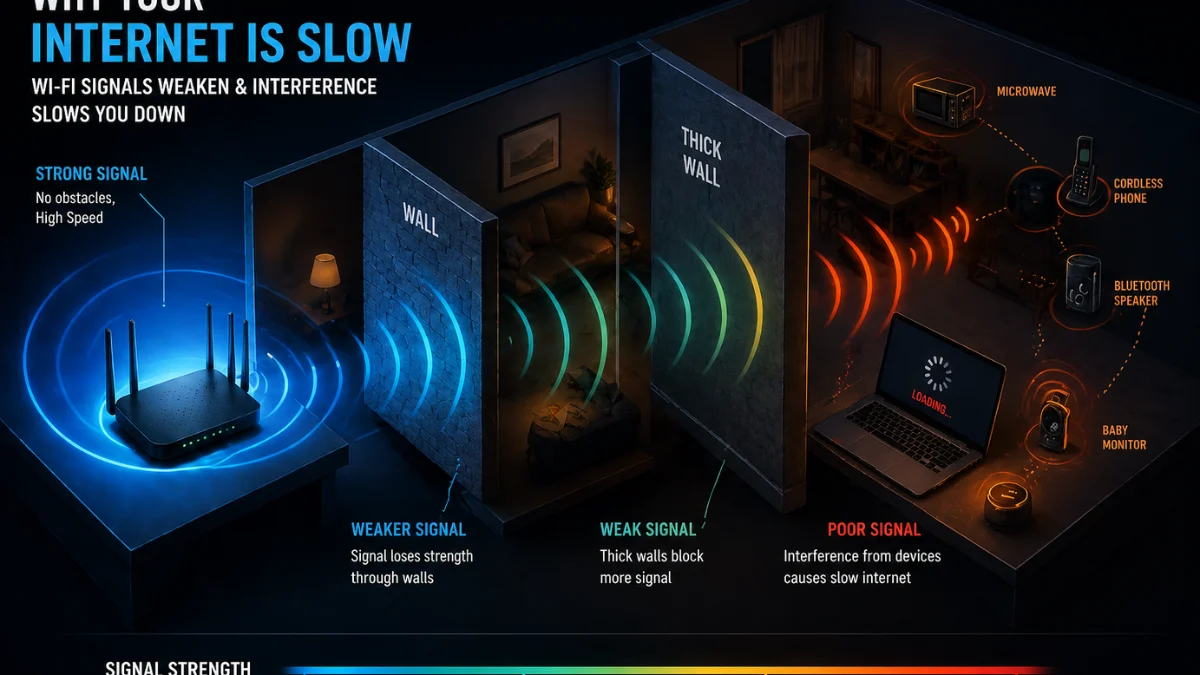
But placement matters. A router tucked behind furniture, placed near walls, or surrounded by electronic devices loses signal strength.
Interference from:
- Microwaves
- Bluetooth devices
- Thick walls
…can quietly degrade your connection.
Sometimes the problem isn’t the internet. It’s how it reaches you.
3. Too Many Devices, Not Enough Bandwidth
Smart TVs, phones, laptops, smart speakers, security cameras—modern homes are packed with connected devices.
Each one consumes bandwidth, even when idle. Background updates, cloud syncs, and app refreshes all add up.
The result? Your connection spreads thin without you realising it.
4. Outdated Hardware Slowing Everything Down
Routers don’t last forever. Older models struggle with modern usage.
If your router is 4–5 years old, it likely wasn’t built for:
- 4K streaming
- Multiple video calls
- Smart home ecosystems
This is one of the most overlooked Technology & Digital Issues—people upgrade their phones but not their network infrastructure.
5. ISP Limitations and Throttling
Internet Service Providers sometimes reduce speeds during heavy usage or for specific activities like streaming or gaming.
It’s not always advertised, but it exists—especially on lower-tier plans.
Sometimes the issue isn’t inside your home at all. It’s upstream.
Why It Matters More Than Ever
A decade ago, slow internet was inconvenient. Today, it’s disruptive.
Work, education, finance, entertainment—everything depends on stable connectivity.
A dropped call isn’t just annoying; it can affect professional credibility. A slow upload isn’t just delayed; it can impact deadlines.
In many ways, internet speed has become a form of infrastructure—like electricity or water. When it fails, daily life pauses.
The Psychology of Digital Frustration
Interestingly, people are less tolerant of slow internet than ever before.
Why? Because expectations have changed.
When systems are designed for instant response—tap, swipe, load—any delay feels unnatural. Even a 2-second lag can feel like a breakdown.
This is part of a broader shift in Technology & Digital Issues:
we’re not just using technology—we’re relying on it for continuity.
And when continuity breaks, frustration feels personal.
How to Actually Fix Slow Internet
1. Restart—But Do It Properly
It sounds basic, but it works.
Turn off your router and modem. Wait 30–60 seconds. Restart.
This clears temporary glitches and refreshes the connection with your ISP.
2. Reposition Your Router
Place your router:
- In a central location
- Elevated (not on the floor)
- Away from walls and electronics
Even small adjustments can significantly improve coverage.
3. Limit Background Usage
Check which devices are consuming bandwidth.
Pause:
- Automatic updates
- Cloud backups
- Streaming on unused devices
Sometimes, speed improves simply by reducing unnecessary load.
4. Upgrade Your Plan or Hardware
If your usage has increased, your plan should reflect it.
Also consider upgrading to:
- Dual-band or tri-band routers
- Mesh Wi-Fi systems for larger spaces
This is less about luxury and more about adapting to modern digital needs.
5. Use Wired Connections When It Matters
For critical tasks—video calls, gaming, uploads—use an Ethernet cable.
Wired connections are more stable and less affected by interference.
6. Run Speed Tests at Different Times
Test your internet:
- Morning
- Afternoon
- Evening
If speeds drop significantly at certain times, the issue is likely network congestion or ISP-related.
The Bigger Picture: A Growing Digital Gap
As internet dependency grows, so does the divide between reliable and unreliable connectivity.
Urban areas face congestion. Rural areas face infrastructure gaps.
And in between, users are left troubleshooting problems they didn’t create.
This is where Technology & Digital Issues move beyond individual inconvenience—they become systemic challenges tied to policy, infrastructure, and access.
What the Future Might Look Like
The next phase of internet infrastructure—5G, fiber expansion, satellite networks—promises faster speeds and wider coverage.
But speed alone won’t solve everything.
The real challenge lies in:
- Managing demand
- Improving consistency
- Ensuring fair access
Connectivity is no longer a luxury. It’s a baseline expectation.
And expectations, once raised, rarely go back down.
More Read

Conclusion
Slow internet isn’t just a technical glitch—it’s a signal. A reminder that the systems we depend on are still evolving, still imperfect, still catching up with how we actually live.
Fixing it isn’t always about one solution. It’s about understanding the layers behind it—devices, networks, infrastructure—and adjusting accordingly.
Because in a world that runs on connection, even a small delay can feel like a disruption.
Final Insight
At its core, slow internet reveals something deeper: we’ve built lives that assume instant access, seamless flow, and constant connectivity.
The real question isn’t just how to fix speed—it’s how to build digital systems that keep up with human expectations.
And until that gap closes, these everyday disruptions will continue to define the modern digital experience. Stay Updated Stay Informed-The Vue Times
Frequently Asked Questions
1. Why is my internet slow even with a good plan?
→ A good plan doesn’t guarantee performance. Factors like Wi-Fi interference, device load, and network congestion can still slow things down.
2. How can I improve Wi-Fi speed at home?
→ Place your router centrally, reduce interference, limit connected devices, and consider upgrading to a modern router.
3. Does restarting the router really help?
→ Yes. It clears temporary issues and refreshes your connection with the ISP, often improving speed instantly.
4. Why is internet slower at night?
→ More people use the internet during peak hours, causing network congestion and reduced speeds.
5. Should I upgrade my router or internet plan first?
→ Check your router first. If it’s outdated, upgrading hardware can improve performance even without changing your plan.